Turn Your Printer into a Photocopy Machine: The Ultimate Dual ID Card Printer
We have all been there. You need a physical copy of your ID card—front and back, perfectly aligned on a single sheet of paper. Perhaps you need it for a bank application, a new job, or a university admission. You don't have time to run to a photocopy shop, and you certainly don't want to pay for something you should be able to do at home.
But when you try to do it yourself, it’s a nightmare. You scan the front, then the back. You open Microsoft Word or Photoshop. You struggle to resize the images. Finally, you print it out, flip the paper, and print again—only to find that the back side is upside down, misaligned, or printed right over the front face. It’s frustrating, wasteful, and time-consuming.
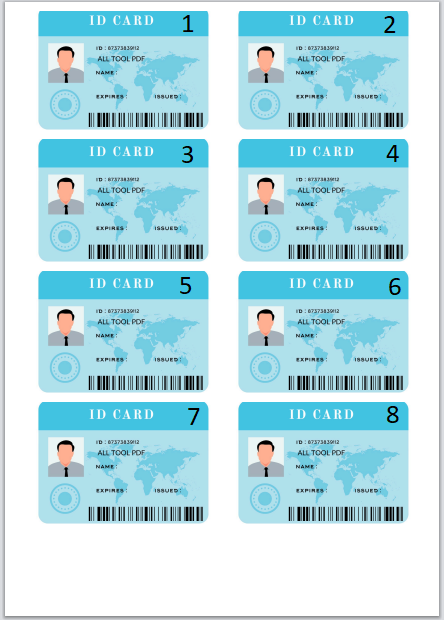
Stop wasting paper and ink. We have built the ultimate Online Dual ID Card Copier. This tool is designed to solve exactly this problem. It transforms your home printer into a professional photocopy machine. It allows you to upload up to 8 different ID cards, crop them to perfection, choose exactly how many copies you need for each, and then—here is the magic—it guides you through a seamless "Front Print" and "Back Print" process.
Why This Tool is Better Than a Physical Photocopier
Traditional photocopy machines are great, but they are bulky, expensive, and often jam. Our digital solution offers you more control, better quality, and significantly more flexibility than a physical machine ever could.
- Smart "Flip" Alignment Logic: The biggest challenge in printing ID cards is aligning the front and back. Our tool calculates the exact mathematical position. You print the "Front" batch, flip the paper, and print the "Back" batch. The tool ensures the back image lands exactly behind the front image.
- Bulk Processing (Up to 8 Cards): Are you running a small shop, an HR department, or just handling family paperwork? You don't need to do one card at a time. You can upload up to 8 different ID cards in one session.
- Custom Quantity Selection: Do you need 5 copies of your Driving License but only 1 copy of your National ID? No problem. You can set the number of copies for each card individually. The tool arranges them smartly on the paper to save space.
- Auto-Gallery Navigation: We know speed matters. When you upload the front side, the tool automatically opens your gallery for the back side. No extra clicks.
Step-by-Step Guide: How to Get the Perfect Print
This tool is built for accuracy and ease of use. Follow this simple workflow to transform your digital photos into physical ID copies in minutes.
Step 1: Smart Upload & Auto-Gallery Switch
We have optimized the workflow for extreme speed. Here is how it works:
- Click the "Upload Front" button.
- Select the image of the front of your card from your gallery.
- Automatic Action: As soon as the file is selected, the system detects it and automatically opens your file manager/gallery again for you to select the Back Side.
This "Auto-Jump" feature saves you clicks and makes the process feel incredibly smooth, especially on mobile devices.
Step 2: Precision Cropping (Clean Up Your Scan)
Most of the time, we take photos of our ID cards on a table, a bedsheet, or in our hands. You don't want that messy background in your final official print. Once your images are uploaded, the Built-in Cropper will activate.
- A cropping box will appear over your image.
- Drag the corners to select only the ID card, cutting out the table surface or background noise.
- Click "Done". This ensures your final print looks like a high-quality scanned document, not a casual photograph.
Step 3: Quantity & Layout Settings
This is where the power lies. For every ID card you upload, you will see a specific counter.
Example Scenario: Imagine you are preparing a visa application for your family. You can upload your ID (set to 3 copies), your spouse's ID (set to 2 copies), and your child's ID (set to 1 copy). The tool will calculate the space and arrange all 6 images onto the A4 sheet automatically.
Step 4: The Printing Process (The Magic Step)
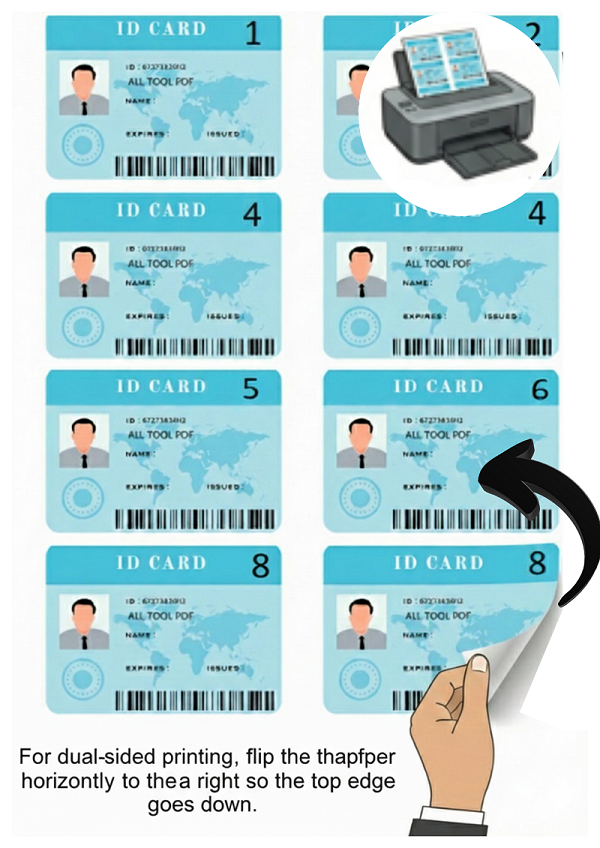
This is the most critical part. To achieve double-sided printing on a standard home printer, we use a manual duplex method. Don't worry, it's easy:
- Click "Print Front": The tool will generate a PDF layout containing only the front sides of all your cards. Send this to your printer.
- Flip the Paper: Once the page comes out, pick it up. Turn it over (usually flipping it on the long edge) and place it back into the printer tray.
Note: Every printer is different. We recommend doing a test with one sheet to see how your printer feeds paper. - Click "Print Back": Now, return to the tool and click the second button. This generates the back-side layout. The images are mathematically positioned to match the front side's position exactly.
- The Result: When the paper comes out the second time, cut out your cards. You will have a perfect two-sided ID card copy!
Daily Life: Which Cards Can You Print?
This tool isn't just for one type of document. It is versatile enough to handle any standard card-sized document. Here are the most common use cases where this tool saves the day:
1. National Identity Cards (CNIC / NID / Aadhaar)
For almost every official task—be it buying a SIM card, opening a bank account, or applying for a passport—you need a photocopy of your National ID. Instead of paying a shop 10 or 20 rupees every time, take a photo once, save it, and use this tool to print copies whenever you need them.
2. Driver's License
Traffic authorities, car rental agencies, and insurance companies often require a hard copy of your license. Ensure both the front (with your photo) and the back (with vehicle class details) are clear and legible. A single A4 sheet can hold up to 4-5 license copies comfortably.
3. Employee & Office ID Cards
This is a favorite feature for Office Managers and HR Admins. With the "8 Cards" feature, an HR admin can upload IDs for 8 new employees at once, set 1 copy for each, and print them all on a single sheet of paper for filing. It’s a massive time-saver compared to photocopying 8 separate cards.
4. Student ID Cards
Schools and universities frequently ask for copies of student cards for exam registration, library access, or bus passes. Parents can easily print these at home for their children without rushing to a shop in the morning.
5. Medical & Insurance Cards
Health insurance cards usually have policy numbers on the front and emergency contact numbers on the back. Both sides are vital in an emergency. Keep a printed copy in your wallet, car, or home file using this tool.
Pro Tips for High-Quality Prints
To get results that look like they came from a professional machine, keep these tips in mind:
- Lighting is Key: When taking the photo, try to use natural daylight (near a window). Avoid using the flash directly on the card, as it creates a bright white spot (glare) on the plastic surface that hides details.
- Contrast: Place your card on a dark background (like a black cloth or a dark table) before taking the photo. This makes the Auto-Cropper work much faster and more accurately, as it can easily detect the edges of the white card.
- Paper Quality: For a "real" card feel, try printing on matte photo paper or cardstock (150-200gsm). However, for standard office submissions or bank forms, regular A4 printer paper is perfectly fine and standard.
- Printer Alignment: Ensure your paper guides in the printer tray are tight against the paper stack. If the paper shifts or wiggles while feeding, the front and back alignment might be slightly off.
Privacy & Security: Your Data Stays With You
We understand that ID cards are sensitive. They contain your full name, address, DOB, and unique identity numbers. That is why we have designed this tool with a Strict Client-Side Policy.
What does "Client-Side" mean? It means that when you upload your ID card images, they are never sent to our server or the cloud. The cropping, the processing, the layout generation—all of it happens inside your web browser using JavaScript (the code that runs on your computer).
Your personal data never leaves your computer or phone. Once you close the browser tab, the images are wiped from memory instantly. You can use this tool with 100% confidence, knowing your identity is safe.
Conclusion: The Future of Photocopying
The Dual ID Card Copier is more than just a tool; it's a smart replacement for the old-school scanner and photocopier. By combining smart image processing, auto-gallery navigation, precision cropping, and a unique two-step printing process, we give you the power to create shop-quality ID copies at home.
Whether you need one copy of your license or copies of IDs for eight different people, this tool adapts to your needs. Save time, save money, and save paper. Try it today and experience the easiest, safest way to manage your ID documentation.